Showing posts with label Graphics(图像图像). Show all posts

Wednesday, March 25, 2009

ImageJ

在网上找能够打开Princeton Instruments的图片格式SPE文件的程序,本来想找WinView和WinSpec竟然找不到。用的人太少了吧。
不过在搜索的时候发现了ImageJ,这个程序能够导入和处理SPE文件,还可以处理32位的TIFF程序。用来处理天文学图片的FITS格式等等。
它还是开源的!

ImageJ Features

ImageJ window

Runs Everywhere:
ImageJ runs on Linux, Mac OS 9, Mac OS X, Windows, and the Sharp Zaurus PDA.
Open Source:
ImageJ and its Java source code are freely available and in the public domain. No license is required.
User Community:
ImageJ has a large and knowledgeable worldwide user community. More than 1700 users and developers subscribe to the ImageJ mailing list.
Macros:
Automate tasks and create custom tools using macros. Automatically generate macro code using the command recorder. More than 300 macros are available on the ImageJ Web site.
Plugins:
Extend ImageJ by developing plugins using ImageJ's built in text editor and Java compiler. More than 500 plugins are available.
Toolkit:
Use ImageJ as a image processing toolkit (class library) to develop applets, servlets or applications.
Speed:
ImageJ is the world's fastest pure Java image processing program. It can filter a 2048x2048 image in 0.1 seconds (*). That's 40 million pixels per second!
Data Types:
8-bit grayscale or indexed color, 16-bit unsigned integer, 32-bit floating-point and RGB color.
File Formats:
Open and save all supported data types as TIFF (uncompressed) or as raw data. Open and save GIF, JPEG, BMP, PNG, PGM, FITS and ASCII. Open DICOM. Open TIFFs, GIFs, JPEGs, DICOMs and raw data using a URL. Open and save many other formats using plugins.
Image display:
Tools are provided for zooming (1:32 to 32:1) and scrolling images. All analysis and processing functions work at any magnification factor.
Selections:
Create rectangular, elliptical or irregular area selections. Create line and point selections. Edit selectoins and automatically create them using the wand tool. Draw, fill, clear, filter or measure selections. Save selections and transer them to other images.
Image Enhancement:
Supports smoothing, sharpening, edge detection, median filtering and thresholding on both 8-bit grayscale and RGB color images. Interactively adjust brightness and contrast of 8, 16 and 32-bit images.
Geometric Operations:
Crop, scale, resize and rotate. Flip vertically or horizontally.
Analysis:
Measure area, mean, standard deviation, min and max of selection or entire image. Measure lengths and angles. Use real world measurement units such as millimeters. Calibrate using density standards. Generate histograms and profile plots.
Editing:
Cut, copy or paste images or selections. Paste using AND, OR, XOR or "Blend" modes. Add text, arrows, rectangles, ellipses or polygons to images.
Color Processing:
Split a 32-bit color image into RGB or HSV components. Merge 8-bit components into a color image. Convert an RGB image to 8-bit indexed color. Apply pseudo-color palettes to grayscale images.
Stacks:
Display a "stack" of related images in a single window. Process an entire stack using a single command. Open a folder of images as a stack. Save stacks as multi-image TIFF files.
* Process>Smooth command, 8-bit image, 3GHz Windows PC, IE 6.0, Microsoft Java 1.1.4.

Thursday, August 21, 2008

PicPick小巧多能的截图编辑工具

作者:xbeta 版本:071024/070822 出自:善用佳软blog.sina.com.cn/xbeta
鸣谢Star兄全面修正!汉化下载 PicPick介绍 原版下载 Big语言文件
  http://www.appinn.com/

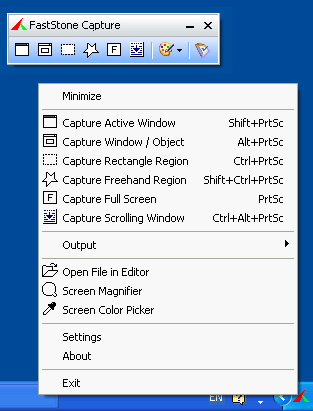
  PicPick:体积小巧花样多的一款免费图形工具。单一exe,体积800KB。除截图(全屏、活动窗口、控件、矩形区域、重复上次截屏、任意自定义区域、网页)功能外,它还有图像基本编辑和标注、取色、标尺、极坐标、直坐标、白板功能。使用起来也很简单,下载exe,运行它,点击系统托盘图标,即可通过弹出菜单选择各种功能。此外,绝大从数操作都有热键,还可以自定义。软件教程见此文……

[使用方法]
  ① 下载原程序 → 运行 → 设定为某种语言(建议英语)
  ② 退出程序 → 复制picpick.lng 到 windows目录,覆盖同名文件
  ③ 重启PicPick,即为中文界面

[补充说明]
  PicPick表面是单一exe程序,但实际上在第一次运行时或更改语言后,会生成语言文件 picpick.lng,放到 windows 目录下。本汉化的原理即为覆盖此文件。因此,当你改变语言时,会生成新lng文件,覆盖汉化文件。如想再回到中文界面,需得复上述步骤②。
  为防止不小心改变语言,也可在汉化后,将 picpick.lng设为只读。
  PicPick解压出的lng文件为Unicode编码,汉化文件未做改变。有网友测试,ansi编码也有效。
  高级用户,可自行修改此文件的翻译,并可通过它设定字体、字号、自动命名的格式等。
PicPick is an all-in-one software for software developers, graphic designers and home user.

It has an intuitive interface and simple, elegant operation. After starting the software, you simply select one of the tool from the PicPick Tools trayicon menu when you want.

It features a powerful capture tool, image editor, color picker, color palette, pixel ruler, protractor, crosshair, whiteboard and etc. You can use all these tools freely.

Wednesday, October 17, 2007

Color Schemer

http://www.colorschemer.com/online.html
This software is not free, but the online edition is free to access.
一个在线配色软件。

Monday, October 15, 2007

image resizer - rsizr.com

Saturday, June 30, 2007

Beneton Movie GIF - Free GIF Editor


Beneton Movie GIF 是一款免费的GIF动画编辑工具。
操作非常简单,可以对动画进行简单的如旋转、删除Frame等操作,还有一些附带的动画效果。所有操作只需用鼠标点点即可。
下载 http://www.benetonfilms.com/bmg.zip
官方网站:http://software.benetonfilms.com/Beneton_Movie_GIF/

Beneton Movie GIF is a free animated GIF editing tool. It is simple, quick, and effective.

Features

* Supports 48 file formats such as BMP, GIF, JPG, PNG, and AVI
* Multiple frames selecting
* Drag and drop frames for a quick editing
* 20 different effects, divided in 2 big categories: normal and animated
* Supports individual frame properties: delay and transparent for each frame
* Save and load a batch of frames (frame1.bmp, frame2.bmp, etc.)
* A complete built-in image editor with many tools (pencil, shapes, airbrush, alpha brush, fill, selection, text)
* A simple preview window that previews individual frames or the animation with options such as zoom, loop, etc.
* Many others!

Wednesday, June 13, 2007

hippocolor - 一个简单的颜色选择工具


功能只有一个,就是在六边形的调色板上选择某种组合的颜色。
http://hippolulu.blogspot.com

Color Calculator 颜色计算器

这个软件是一个专业设计学校开发的用于选择颜色搭配的软件。
使用 Flash编制,有网络版本 http://dev.sessions.edu/ilu/ilu_1.html
离线版本在这里:http://www.sessions.edu/career_center/design_tools/color_calculator/index.asp
官方网站的介绍如下:

The Sessions Color Calculator is an interactive color wheel that helps designers select HTML, RGB, or CMYK colors and identifies color harmonies and schemes. Our Color Wheel works faster than any other color wheel or html color chart.

Designers may save HTML safe color values, CMYK color schemes, or RGB colors to an integrated clipboard and email the colors to colleagues or clients. You can also rotate shapes on the color wheel to identify harmonious color schemes, adjust the saturation and lightness of colors, or select a color plan to use for a corporate identity or design project.

Colors may be selected and applied to both print and Web design – the Sessions color wheel color calculator saves hours of work. A color scheme can be further refined by choosing different designs or patterns with different complexity levels.

For a thorough examination of Color, its systems, interactions and how to advantageously use this knowledge in art and design, please see Color Theory.

ColorPic

通过鼠标和快捷键进行屏幕颜色选取,还可以在调色板上选取颜色,得到颜色的RGB编号等等。
特别是可以选取多种颜色,并保存为一个颜色组合。
详情请看官方网站:
http://iconico.com/colorpic/
下载连接http://iconico.com/colorpic/download.aspx

官方网站上的介绍:

  • Easily pick any color from the screen
  • Totally 100% Free!
  • No popup adverts or spyware, it really is free
  • Colors shown in hex and decimal
  • Adjust Hue, Saturation, Value, Red, Green and Blue values
  • Cyan, Magenta, Yellow and Black percentages shown
  • Easy to use with any other program
  • Resizable magnification area
  • Overlay a grid for quick colorpicker alignment
  • Use arrow keys to nudge mouse pointer
  • Save multiple palettes of colors automatically
  • WebSafe Colors and names displayed
  • Snap to nearest WebSafe color
  • Point sample, 3x3 or 5x5 pixel color sampling
  • Adjust color with four advanced color mixers
  • Edit colorpicker values after selection easily
  • Easy to use collapsible sections
  • Works with Firefox, Internet Explorer, Photoshop and any other application

Thursday, May 17, 2007

FreeCAD


免费的CAD软件,类似于3D MAX或者 AutoCAD
相关介绍http://juergen-riegel.net/FreeCAD/Docu/index.php?title=Main_Page
下载


FreeCAD will be a general purpose 3D CAD modeller. The development will be completely Open Source. As modern 3D CAX modellers it will have a 2D component to extract design drawings from the 3D model, but 2D (like AutoCAD) is not the focus, neither are animation and organic shapes (Maya, 3D StudioMAX, Cinema 4D). FreeCAD will aim directly to mechanical engineering, product design and related features (like CatiaV4 and V5, and SolidWorks). It will be a feature based parametric modeler.

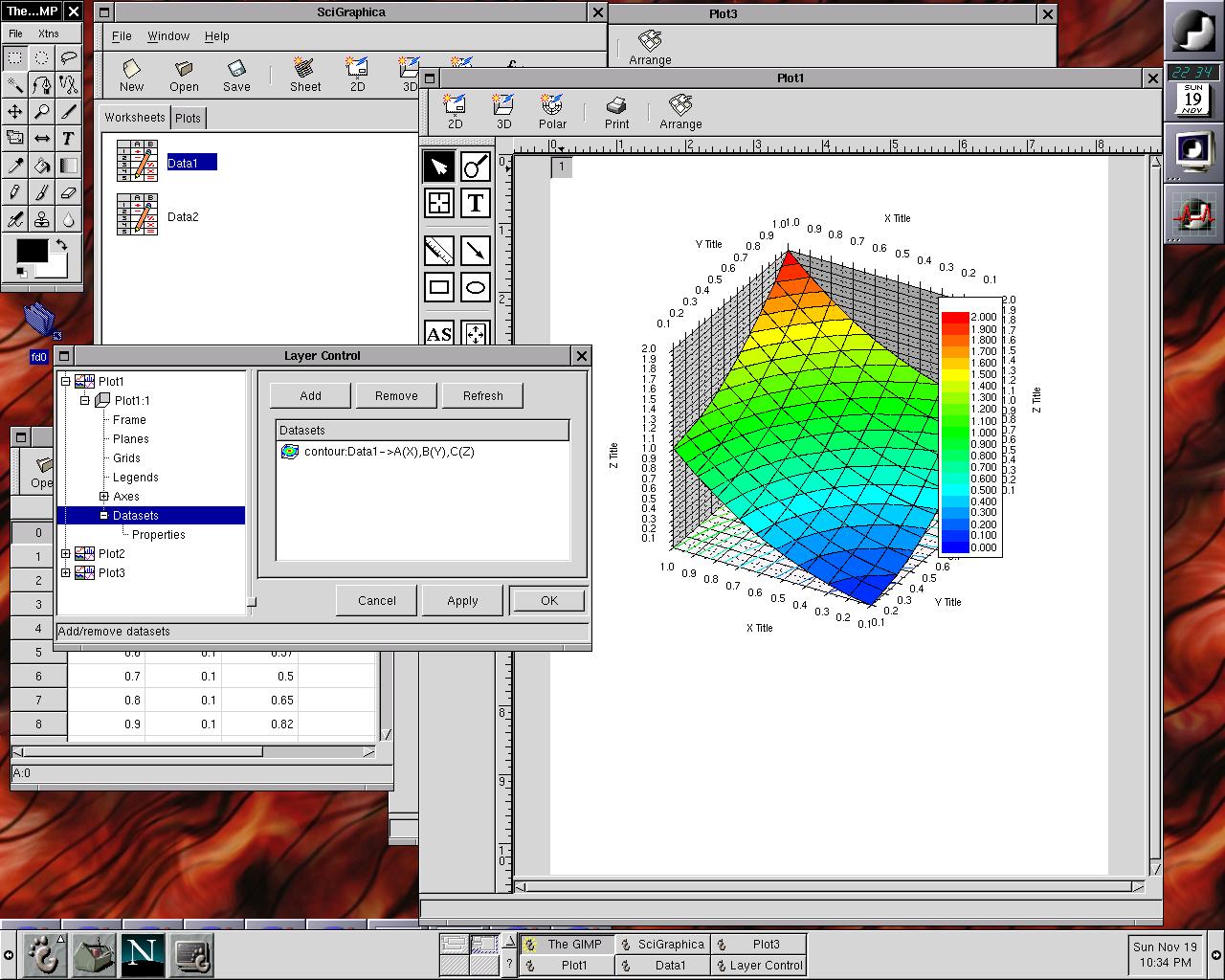
SciGraphica - Linux 下的科学图像处理


SciGraphica没有Windows版本,所以这可能影响了它的普及。我也没有用过,不过似乎和Origin一样强大。

http://scigraphica.sourceforge.net/index.html
windows下的同类型免费软件可以参考Gnuplot,或者Scilab 这样附带绘图功能的科学计算程序

SciGraphica is a scientific application for data analysis and technical graphics. It pretends to be a clone of the popular commercial (and expensive) application "Microcal Origin". It fully supplies plotting features for 2D, 3D and polar charts. The aim is to obtain a fully-featured, cross-plattform, user-friendly, self-growing scientific application. It is free and open-source, released under the GPL license.

Main features:

  • You can plot functions and manipulate data in worksheets.
  • You can open several worksheets and plots and work with them interactively and at the same time.
  • The plots are fully configurable using a control panel dialog.
  • The look and feel is completely WYSIWYG.
  • Production/Publication quality PostScript output.
  • You can interact with the plots double-clicking, dragging and moving objects with the mouse.
  • Native XML file format.
  • You can insert Python expressions in the worksheets.
  • Terminal with command-line Python interface for interacting with plots and worksheets

It is completely programmed in C from scratch, using the GTK+ and GtkExtra libraries, and released under the GPL agreement.

SciGraphica - Linux 下的科学图像处理


SciGraphica没有Windows版本,所以这可能影响了它的普及。我也没有用过,不过似乎和Origin一样强大。

http://scigraphica.sourceforge.net/index.html
windows下的同类型免费软件可以参考Gnuplot,或者Scilab 这样附带绘图功能的科学计算程序

SciGraphica is a scientific application for data analysis and technical graphics. It pretends to be a clone of the popular commercial (and expensive) application "Microcal Origin". It fully supplies plotting features for 2D, 3D and polar charts. The aim is to obtain a fully-featured, cross-plattform, user-friendly, self-growing scientific application. It is free and open-source, released under the GPL license.

Main features:

  • You can plot functions and manipulate data in worksheets.
  • You can open several worksheets and plots and work with them interactively and at the same time.
  • The plots are fully configurable using a control panel dialog.
  • The look and feel is completely WYSIWYG.
  • Production/Publication quality PostScript output.
  • You can interact with the plots double-clicking, dragging and moving objects with the mouse.
  • Native XML file format.
  • You can insert Python expressions in the worksheets.
  • Terminal with command-line Python interface for interacting with plots and worksheets

It is completely programmed in C from scratch, using the GTK+ and GtkExtra libraries, and released under the GPL agreement.

Wednesday, May 16, 2007

ASCII Pic - 图片到字符图案


将jpg格式的图片转化为用ASCII字符表示的文本。
在这里下载:http://w3.to/5679soft/
或者在Google中搜索 ASCII Pic 2.0。
这是一个示例图片:

这是产生的Txt文件内容:

其它的内容可以参照:
http://c6.org/toogle/
ASCII Image Search
这个网站可以返回用户关键字对应的第一个图片的ASCII版本,而且是彩色版的。
下面是Firefox对应的Google Image Search的第一个图片

这个是Toogle Image Search返回的第一个ASCII结果


感兴趣的还可以去http://www.asciimaps.com/,这个是Google Maps的ASCII版本。这个世界上可是什么都有啊。。。

Sunday, May 13, 2007

Webshot - 网页截图程序


抓取网页并转化为jpg图片。http://www.websitescreenshots.com/
下面是程序发布网站的一张网页截图。

Thursday, May 3, 2007

Picasa 最佳图片管理软件


Google的一个图片管理工具,自动搜索电脑上的图片和视频,可以快速查找,预览。独特的界面设计使用方便。
如果你有一个网络账户,就可以将图片上传到网上,与朋友分享。
你还可以对图片进行简单的处理和转化,生成HTML相册等等。

Sunday, April 22, 2007

Segger 从照片到简笔画


Segger可以把照片处理成简笔画,看了上面两幅图就知道了,还等什么,下载吧:
http://www.poorbruce.com/SeggerHomePage.htm